What is the CTDynamicModMenu?
The CTDynamicModMenu is a universal BepInEx-Mod to easily create ModMenu’s for games. It provides the ability to Register Commands which then automatically get rendered in Categorized Tabs. These Commands can be Toggles for Mods, Commands with arguments to set specific values etc.
(WIP) It also can automatically create BepInEx-Config files and persist the settings if the command is configured for that
Features
- Automatically generated Menu with Tabs for Categories
- Toggle Functionality with color coding
- Commands with Arguments with automatic parsing
- Name, Description and format for Help/Doc function
- Command Window for using the mods as /commands with autocompletion
- Log window for CTDynamicModMenu-Mods
- Set Keybinds for Commands
- Settings for the Menu
- (WIP) Automatic config generation and persistance
How do i use this in my mod?
To use the CTDynamicModMenu in your mod, you need to download the .dll file and reference it in your .csproj file. After that you need to add the Dependency to the mod by adding the following to the top of your Main Plugin-Class:
[BepInDependency("Toemmsen96.CTDynamicModMenu")]
Which would something like this:
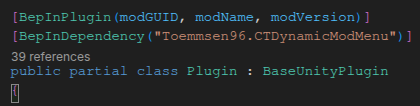 Picture 1: BepInEx Dependency for CTDynamicModMenu
This way the CTDynamicModMenu gets loaded before your plugin, ensuring that there isn’t a problem loading everything.
Adding Mods/Commands to the Menu
To add mods to the Menu, you need to write Classes which Inherit from “CustomCommand”.
After that you also need to Register all the “CustomCommands”. This is done the By adding a Category these Commands get sorted into their separate tabs automatically.
Below are some examples:
CustomCommand-Class
using BepInEx;
using UnityEngine;

namespace CTDynamicModMenu.Commands
{
    public abstract class CustomCommand
    {
        // Required properties for the command
        public abstract string Name { get; }
        public abstract string Description { get; }
        public abstract string Format { get; }
        public virtual string? AlternativeFormat { get; } = null; // Optional alternative format for the command, e.g. for a shorter alias
        public abstract string Category { get; }

        // Optional configuration functionality
        public virtual bool HasConfig { get; } = false;
        public virtual bool PersistConfig { get; } = false;

        // Optional toggle functionality
        public virtual bool IsToggle { get; } = false;
        public virtual bool IsEnabled { get; set; } = false;

        // Optional keybind functionality
        public virtual KeyCode? Keybind { get; set; } = null;
        public virtual bool RequireControlKey { get; set; } = false;
        public virtual bool RequireAltKey { get; set; } = false;
        public virtual bool RequireShiftKey { get; set; } = false;

        public bool Handle(string message)
        {
            CommandInput command = CommandInput.Parse(message);

            if (command == null)
            {
                return false;
            }

            // Check name
            if (command.Command != this.Format.Split(' ')[0].Trim('/'))
            {
                return false;
            }

            // Toggle state if it's a toggle command
            if (IsToggle)
            {
                IsEnabled = !IsEnabled;
                SaveConfig();
            }

            // Execute command
            this.Execute(command);
            return true;
        }

        public abstract void Execute(CommandInput? message);

        // Method to check if keybind is pressed
        public bool IsKeybindPressed()
        {
            if (Keybind == null) return false;
            bool modifiersMatch =
                (!RequireControlKey || UnityInput.Current.GetKeyDown(KeyCode.LeftControl) || UnityInput.Current.GetKeyDown(KeyCode.RightControl)) &&
                (!RequireAltKey || UnityInput.Current.GetKeyDown(KeyCode.LeftAlt) || UnityInput.Current.GetKeyDown(KeyCode.RightAlt)) &&
                (!RequireShiftKey || UnityInput.Current.GetKeyDown(KeyCode.LeftShift) || UnityInput.Current.GetKeyDown(KeyCode.RightShift));

            return modifiersMatch && UnityInput.Current.GetKeyDown(Keybind.Value);
        }

        public void LoadConfig()
        {
            if (!HasConfig) return;
            if (Keybind != null)
            {
                Keybind = CTDynamicModMenu.Instance.Config.Bind<KeyCode>("Command Settings", $"{Name}: Toggle Key", Keybind.Value, "Key to toggle the menu").Value;
            }
            if (IsToggle)
            {
                IsEnabled = CTDynamicModMenu.Instance.Config.Bind<bool>("Command Settings", $"{Name}: IsEnabled", IsEnabled, "Whether the command is enabled").Value;
            }
        }
        public void SaveConfig()
        {
            if (!HasConfig || !PersistConfig || !CTDynamicModMenu.Instance.persistentSettings) return;
            if (Keybind != null)
            {
                CTDynamicModMenu.Instance.Config.Bind<KeyCode>("Command Settings", $"{Name}: Toggle Key", Keybind.Value, "Key to toggle the menu").Value = Keybind.Value;
            }
            if (IsToggle)
            {
                CTDynamicModMenu.Instance.Config.Bind<bool>("Command Settings", $"{Name}: IsEnabled", IsEnabled, "Whether the command is enabled").Value = IsEnabled;
            }
        }
    }
}
Example Implementations
Toggle Functionality
using CatanImprovements.Patches;
using static CTDynamicModMenu.CTDynamicModMenu;
using CTDynamicModMenu.Commands;

public class InviteAllCommand : CustomCommand
{
    public override string Name => "Invite All Command";

    public override string Description => "when on automatically invites all friends";

    public override string Format => "/inviteall";

    public override string Category => "Lobby";
    public override bool IsToggle => true;
    public override bool IsEnabled
    {
        get
        {
            return Patches.autoInviteFriends; //This defines what value is toggled when clicking the toggle
        }
        set
        {
            Patches.autoInviteFriends = value; //This defines what value is toggled when clicking the toggle
        }
    }
    public override bool HasConfig => true;
    public override bool PersistConfig => true;

    public override void Execute(CommandInput message)
    {
        Instance.DisplayMessage("Not Implemented properly yet");
        Instance.DisplayMessage("Auto Invite Friends:" + Patches.autoInviteFriends);

    }
}
Argument Functionalitys
using CTDynamicModMenu.Commands;

public class SetPlayerHealthCommand : CustomCommand
{
    public override string Name => "Set Player Health";

    public override string Description => "Sets the player's health to a specified value";

    public override string Format => "/sethealth <value>";

    public override string Category => "Player";

    public override void Execute(CommandInput message)
    {
        if (message.Args.Count < 1)
        {
            CTDynamicModMenu.CTDynamicModMenu.Instance.DisplayMessage("Usage: /sethealth <value>");
            return;
        }

        if (int.TryParse(message.Args[0], out int healthValue))
        {
            if (healthValue < 0 || healthValue > 100)
            {
                CTDynamicModMenu.CTDynamicModMenu.Instance.DisplayMessage("Health must be between 0 and 100");
                return;
            }

            // Set player health
            Player.Instance.Health = healthValue;
            CTDynamicModMenu.CTDynamicModMenu.Instance.DisplayMessage($"Player health set to {healthValue}");
        }
        else
        {
            CTDynamicModMenu.CTDynamicModMenu.Instance.DisplayMessage("Invalid health value specified");
        }
    }
}
References / Examples
An example on how you can use CTDynamicModMenu, you can look at my Fallout Shelter Cheat, where this is used.